


Beans - Maps for Apartments
2.1564.00 Reviews
App Specs
- Version
- 5.4
- Updated On
- License
- Free
- Downloads
- 50,000+
- Developer
- One Hundred Feet, Inc.
- Categories
- Maps & Navigation
- Platform
- Android
Screenshots


 Analysis by AppCompare
I judge a home-search app less by how many pins it can put on a screen and more by whether it helps me make a sensible shortlist. Apartment hunting involves trade-offs between the unit, the neighborhood, the commute, and the timing of a visit. Beans - Maps for Apartments is built around that map-first way of thinking, which can be handy when you are comparing places across several blocks rather than searching one building at a time.
What a map-first search changes
In a conventional listing search, I often start with a long results page and have to remember where each property sits. A map makes location part of the decision from the beginning: I can see whether options cluster near a station, sit on opposite sides of a busy road, or are spread across a wider area. For someone who already knows the part of town they want, that can make the early search feel more practical than scrolling through listings without geographic context.
The map is also useful when my requirements are flexible. I might begin with one neighborhood, then zoom out to see whether a nearby area has more plausible choices. That does not tell me which place is best, but it helps me notice the shape of the search and adjust my boundaries before I spend time contacting anyone. I would still check each listing’s details rather than treating a pin as proof that a property fits.
Where it fits in an apartment hunt
Beans is a free app in the Maps & Navigation category, developed by One Hundred Feet, Inc. Its focus is narrower than a general-purpose map: the idea is to bring apartment options and location-based planning into the same search. That makes it most appealing to renters who are actively comparing areas and want to move from browsing to planning a visit without constantly switching between separate tools.
For example, imagine I have a free afternoon and three possible apartments to see. I can use the map to understand where they are relative to one another, then use the navigation function to plan how to get to the places I want to visit. I would still leave room for delays and confirm appointment times directly; a route can help with the journey, but it cannot guarantee that a viewing is available or that a listing remains open.
What the rating suggests—and what it cannot
The app has an average rating of 2.2 from around 1,500 ratings, alongside roughly 560 written reviews. That is a notably mixed public reception, so I would approach it with realistic expectations rather than assuming every part of the experience will feel polished. Ratings can reflect different devices, locations, and user needs, but this one is low enough that I would test the basic search and map interaction early, before making it the only tool in a time-sensitive move.
Beans has passed 50,000 installs, which shows that it has reached a meaningful group of apartment hunters, though it is not a reason on its own to trust every listing or depend on the app exclusively. I would use it as one input in a broader search: compare the locations here, then verify important details with the person or property responsible for the listing. That extra check matters whenever availability, fees, or a viewing schedule could change.
Worth Reading Before You Choose

EA SPORTS FC Mobile 26 Is a Bigger Football Game, but It Takes Time

Flipboard Shows What News Apps Must Do Beyond the Feed

Switching to Android Auto Means Rethinking Your Driving Routine

Google Calendar Makes a Crowded Week Easier to Manage

Ludo King Makes the Most of the Minutes Between Plans

Baby Panda World Brings Quick Play to Modern Phones, but Its Game Library Feels Busy
Cost, compatibility, and a sensible trial
Beans is free to download, with in-app purchases listed at $4.99 per item. It is rated for Everyone, and the current version is 5.4; the app’s release date is November 19, 2018. It supports Android 6.0 and later, so people using older software should check compatibility before planning around it. I would begin with the free experience and decide whether any paid item is useful only after seeing what it offers in practice.
The version number tells me that the app has continued beyond its initial release, but it does not by itself prove which features have changed or how reliably they work today. For existing users, the practical question is whether the current build still supports the parts of their routine they depend on: finding relevant apartments, reviewing their locations, and getting directions when arranging a visit. I would check those basics after installing or updating instead of assuming a version label guarantees a particular improvement.
When another tool is the better choice
A general mapping app is usually the better choice once I have an address and simply need dependable directions. A broad rental marketplace may be more useful if I want to compare a very large range of listing details or contact options in one place. Beans makes the most sense when the map itself is central to the decision—especially when I am weighing neighborhoods, looking for nearby destinations, or trying to organize several candidate addresses.
I would not rely on it as my only source if I have a strict move deadline, unusual requirements, or a narrow budget where every condition must be confirmed. In that situation, I would keep a separate shortlist and verify availability, costs, and property details directly. The useful trade-off is clear: a map can reveal spatial relationships quickly, but it cannot replace careful checks of the listing or a conversation with the person handling the property.
Small habits that make the search more useful
One practical approach is to search a little wider than the first neighborhood that comes to mind, then narrow the area after checking what the map reveals. I would also compare pins against the actual route I expect to travel, rather than assuming that two nearby locations are equally convenient. Rivers, highways, hills, and limited crossings can make a short straight-line distance misleading, so the route matters as much as the map’s visual proximity.
When I save possible homes, I would make my own quick notes outside the map: why each place made the shortlist, what needs confirmation, and which question to ask before booking a visit. This prevents a familiar problem during a busy search—remembering the location but forgetting whether the listing matched a key requirement. It also makes it easier to compare a promising unit with a less attractive one in a better area.
Nearby points of interest can help me screen an area, but I would treat them as prompts for further checking, not a complete picture of daily life. A grocery store or park on a map does not tell me its hours, the safest route at night, or whether the walk feels comfortable. If the neighborhood matters as much as the apartment, I would use the map to decide where to explore in person rather than making the final call from pins alone.
Who should try it, and what to watch
I would recommend giving Beans a try if you are in the early or middle stages of an apartment search and think spatial comparison will help you choose where to look. It may be especially useful if you are new to an area, have several neighborhoods under consideration, or want to turn a scattered set of addresses into a manageable visit plan. Renters who already have a specific property and only need turn-by-turn directions may get more value from their usual navigation app instead.
Before committing your whole search to Beans, I would test a few concrete questions: can I find options in the areas I care about, are the details useful enough to compare them, and does navigation fit the way I plan visits? I would also check whether the app’s current behavior suits my device and needs, then keep another search route available if results are sparse or inconvenient. That is a more reliable way to judge a low-rated app than either dismissing it at a glance or trusting it blindly.
What I would watch over time is whether the current experience remains useful for both discovery and planning. A map-based apartment app earns its place when it helps me make a better location decision, not merely when it displays listings. If Beans does that for the neighborhoods I am considering, it can be a useful companion; if the search feels thin or the details do not answer my practical questions, I would move on to a broader rental service and use a dedicated map for the trip itself.
Finding Your Next Home, Simplified
When I first downloaded Beans - Maps for Apartments, I was intrigued by its clean interface and how straightforward it was to navigate. The app opens up to a map highlighting available apartments in your desired area. It’s like Google Maps but tailored specifically for apartment listings. Honestly, it feels like magic.
Easy-to-Use Interface
One of the first things that caught my attention was how user-friendly the app is. You don’t need a tech degree to figure it out. Right off the bat, you can search for apartments by entering your preferred location. The map is responsive and updates in real-time as you zoom in and out, giving you a bird’s-eye view of your options.
The app also allows you to filter results based on your specific needs, like price range, number of bedrooms, and pet policies. It’s like having a real estate agent in your pocket, minus the commission fees.
Getting the Details Right
Each apartment listing provides comprehensive details, including photos, floor plans, and amenities. I found this particularly useful because, let’s face it, pictures can sometimes be deceiving. Having all the info laid out helps in making an informed decision. Plus, you can save your favorite listings to compare later.
What’s even cooler is the feature that highlights points of interest nearby, such as grocery stores, parks, and schools. It’s those little details that truly help you envision what your life could be like in a new neighborhood.
Navigation Made Easy
Another standout feature is the app’s built-in navigation. Once you’ve pinpointed an apartment you’d like to visit, the app offers step-by-step directions. I found it incredibly efficient, especially when you’re trying to schedule multiple viewings in a day. No more getting lost or missing appointments!
Alerts and Updates
For those who are serious about staying in the loop, the app allows you to set up alerts for new listings. I set mine to notify me about apartments in my preferred area, and it works like a charm. You can even set alerts for price drops, which is a fantastic feature if you’re trying to snag a deal.
The app keeps everything updated, ensuring you’re not wasting time on listings that are no longer available. This level of detail is a game-changer for anyone who has ever had their hopes dashed by outdated information.
Your Apartment Hunt Companion
As someone who has moved multiple times, I can confidently say that Beans - Maps for Apartments is a game-changer. It takes the stress out of apartment hunting and makes it, dare I say, enjoyable. Whether you’re a first-time renter or a seasoned mover, this app is the perfect companion on your search for a new place to call home.
So, if you’re in the market for a new apartment, do yourself a favor and give this app a try. It’s a time-saver, stress-reliever, and honestly, a bit of a lifesaver. Happy hunting!
Pros
- User-friendly interface with intuitive navigation.
- Detailed maps with apartment layouts included.
- Real-time updates for availability and pricing.
- Customizable search filters for precise results.
- Secure login and data protection measures.
Cons
- Limited coverage in rural or less populated areas.
- Occasional app crashes reported by some users.
- Requires a stable internet connection to function.
- Ads can be intrusive without a premium upgrade.
- Limited integration with external real estate services.
FAQs for Beans - Maps for Apartments
What is the main purpose of Beans - Maps for Apartments?
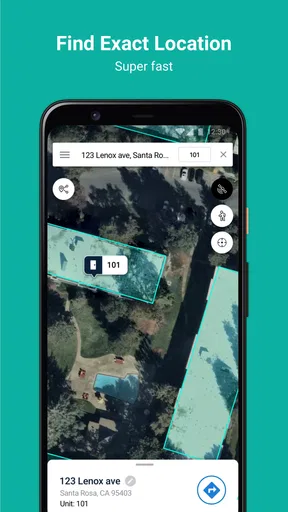
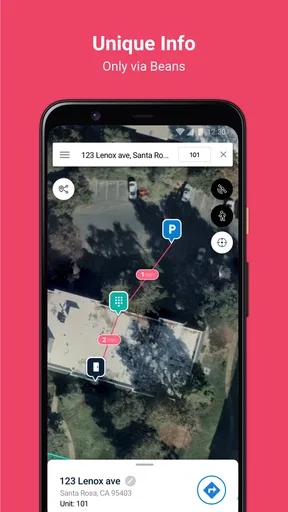
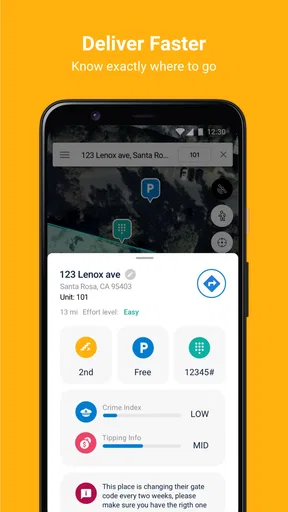
Beans - Maps for Apartments is designed to help users navigate apartment complexes more efficiently. Whether you're a delivery driver, visitor, or resident, the app provides detailed maps and directions within large apartment complexes, making it easier to find specific units or amenities without getting lost.
Is Beans - Maps for Apartments available for both Android and iOS?
Yes, Beans - Maps for Apartments is available for download on both Android and iOS platforms. You can find it on the Google Play Store for Android devices and the Apple App Store for iOS devices, ensuring a wide range of users can benefit from its features.
Does Beans - Maps for Apartments require an internet connection to work?
While the app may offer some offline functionality, it primarily relies on an internet connection to provide real-time updates and navigation. This ensures that users receive the most accurate and up-to-date maps and directions within complex apartment layouts.
How accurate are the maps and directions provided by Beans - Maps for Apartments?
The app is designed to offer precise and reliable navigation within apartment complexes. It uses a combination of user-generated data and verified information to ensure accuracy. However, as with any navigation tool, occasional discrepancies may occur, and user feedback is encouraged to enhance map precision.
Is there a cost associated with using Beans - Maps for Apartments?
Beans - Maps for Apartments is free to download and use. However, it may offer in-app purchases or premium features that enhance the user experience. Always check the app store for the latest pricing information and any potential subscription options.


